
INTRODUCTION
What’s Abulé?
Currently a seed-stage startup, Abulé is a community based care-platform helping families by enabling mutually beneficial care exchanges
Project Overview
I structured Abulé's interconnected admin ecosystem and designed the Community Admin Portal, a role-based management system enabling web-app community admins to operate independently and preparing the platform for public launch.
Timeline
2 months (April - May 2025)
Tools
Figjam, Figma, Linear, Microsoft Teams
WHAT DID I DO?
My Role & Focus:
I led the strategy, IA, and UX design, crafting a 0 to 1 approach. This involved working closely with the Founder and Lead Engineer to define the roadmap, simplify platform architecture, extend the design system and delivering MVP modules including navigation, billing, roles and access management, and event insights.
Abulé's web app where members connect, create communities, and support each other was getting ready for launch. However, operational control and oversight was missing across three distinct user groups:
THE PROBLEM
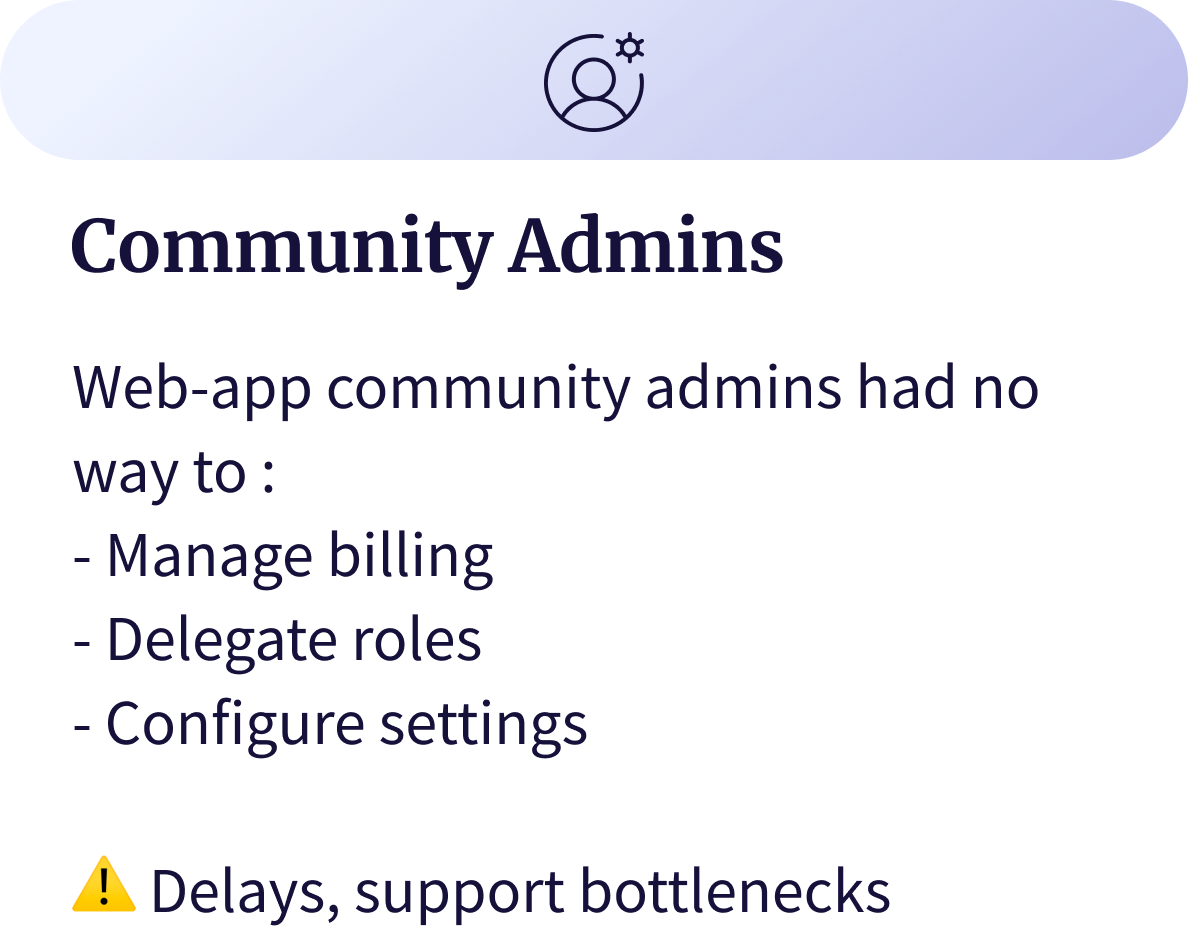
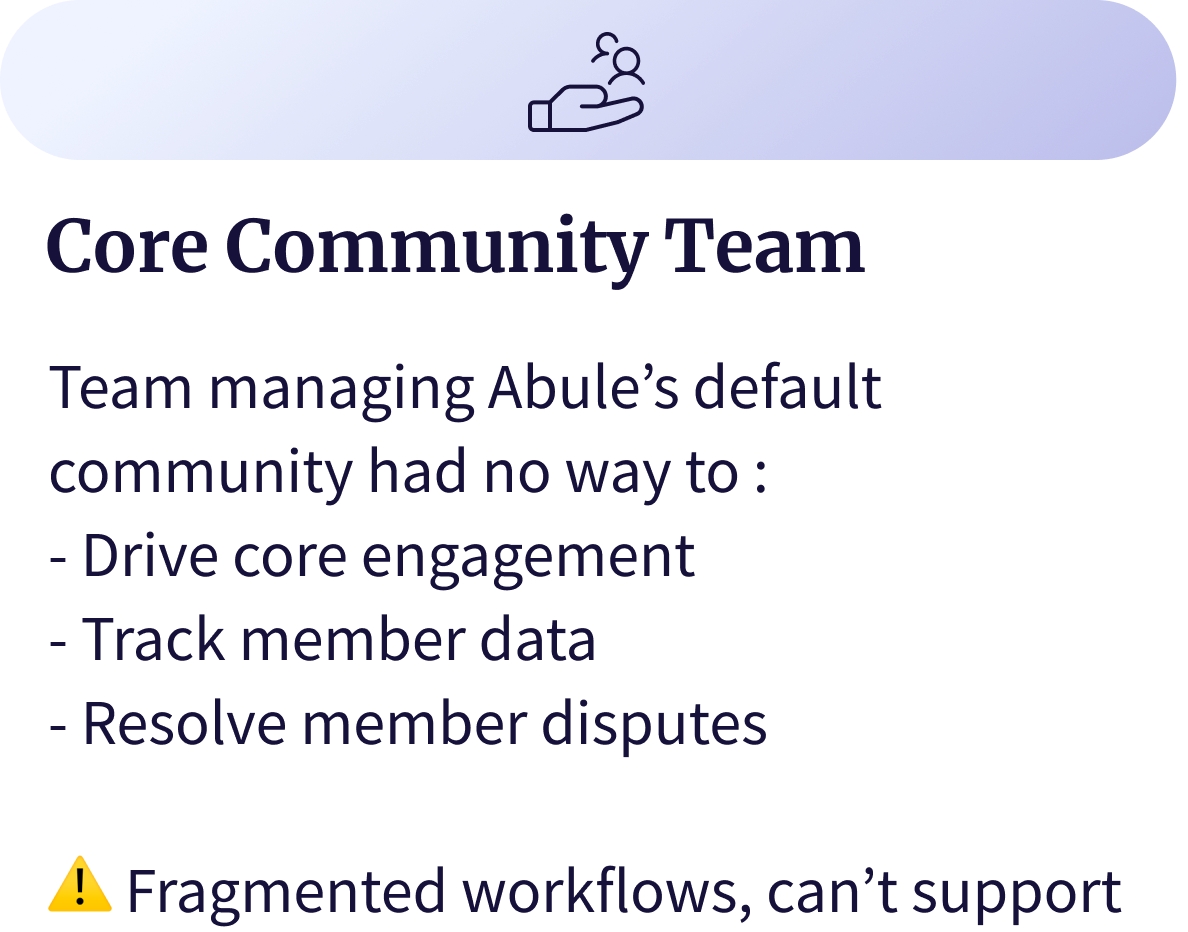
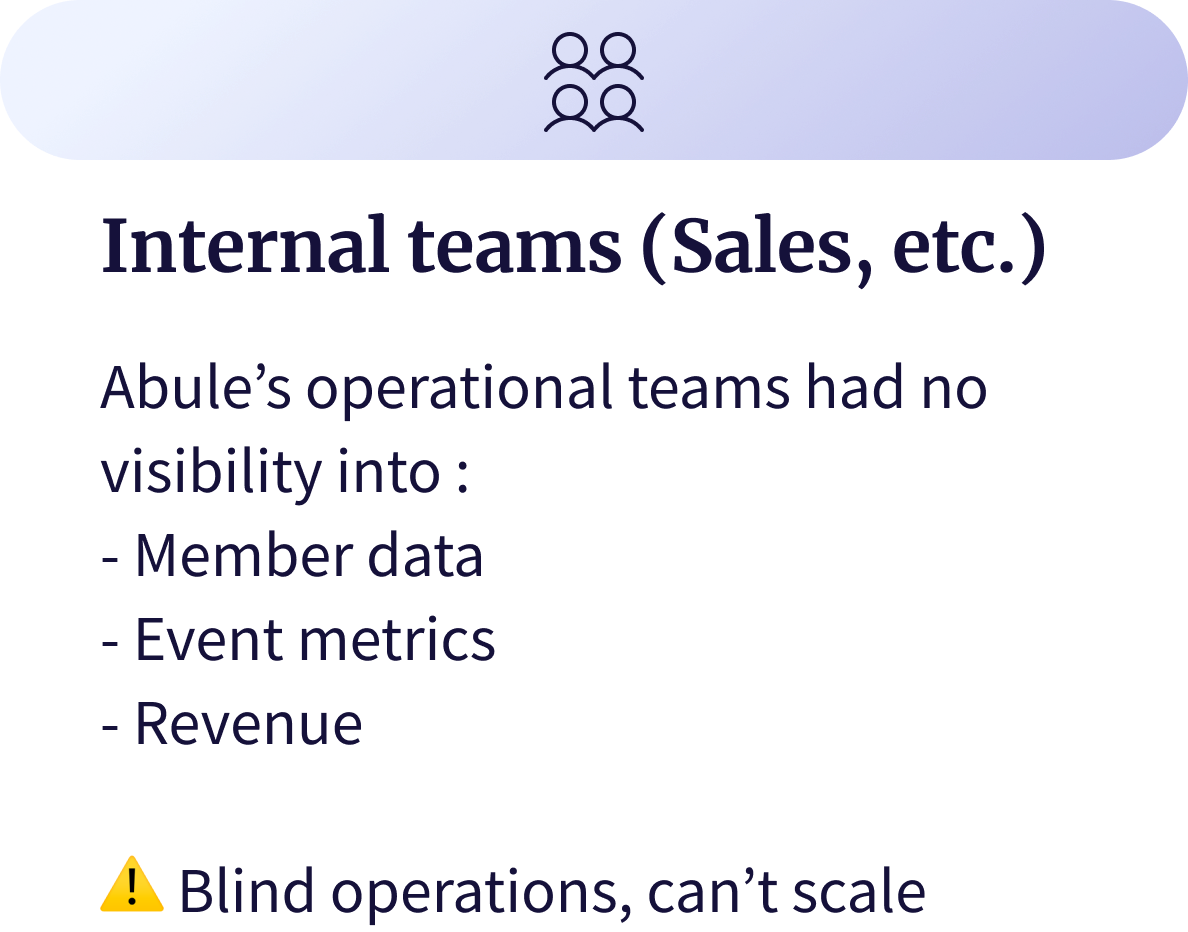
Without admin portals, communities would be unmanageable, billing would remain manual, internal teams had no visibility into member data or events. Fragmented workflows and support bottlenecks would block revenue and scale.
Users needed to move smoothly between the web-app and admin tools without losing context.
Map multiple user types with different permissions, and how internal teams and web-app community admins intersect operationally.
Every IA, permission, or navigation choice had backend, scalability, and roadmap implications, requiring close alignment with Eng. + Founder.
We had ~2 months to deliver a functional foundation while balancing the existing engineering lag on the member-facing web-app.
KEY CHALLENGES
My first step was aligning with the founder: clarifying expectations and agreeing on a realistic 2-month roadmap for a 0→1 delivery.
APPROACH
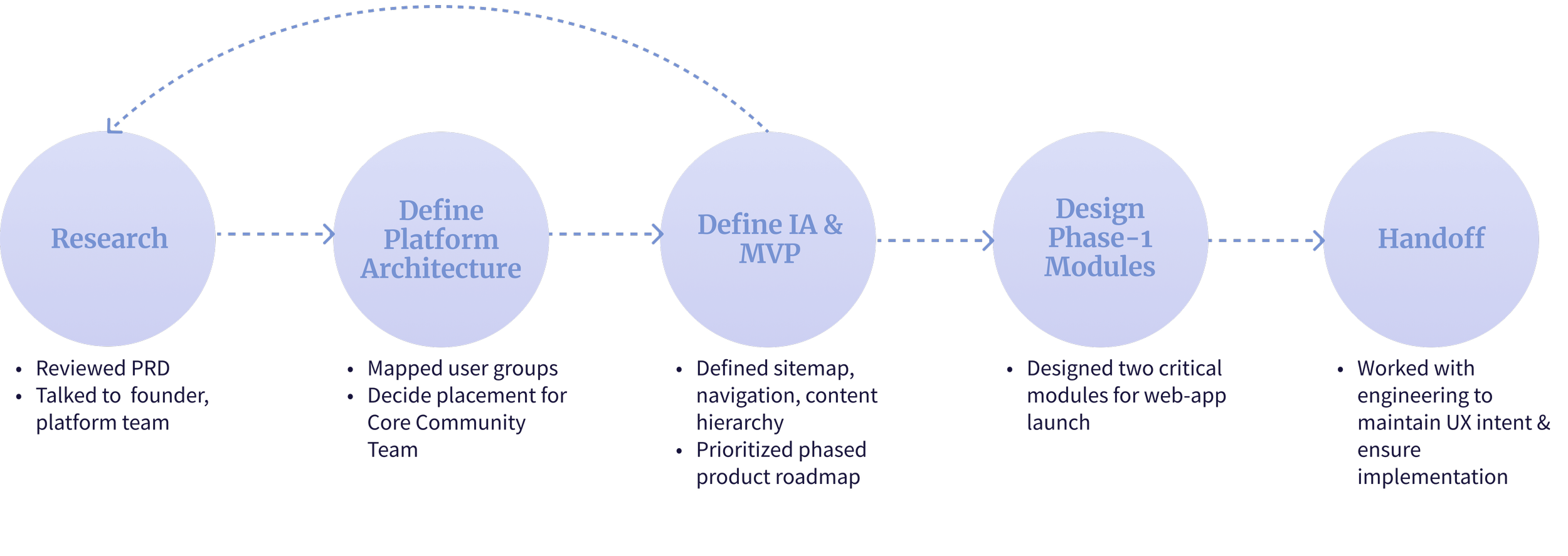
To move from ambiguity to clarity, I followed a modified design-thinking process adapted for a fast-paced environment with limited research resources. I focussed on:
Who are the users?
What are their goals? What tasks would they perform?
Where do their needs overlap?
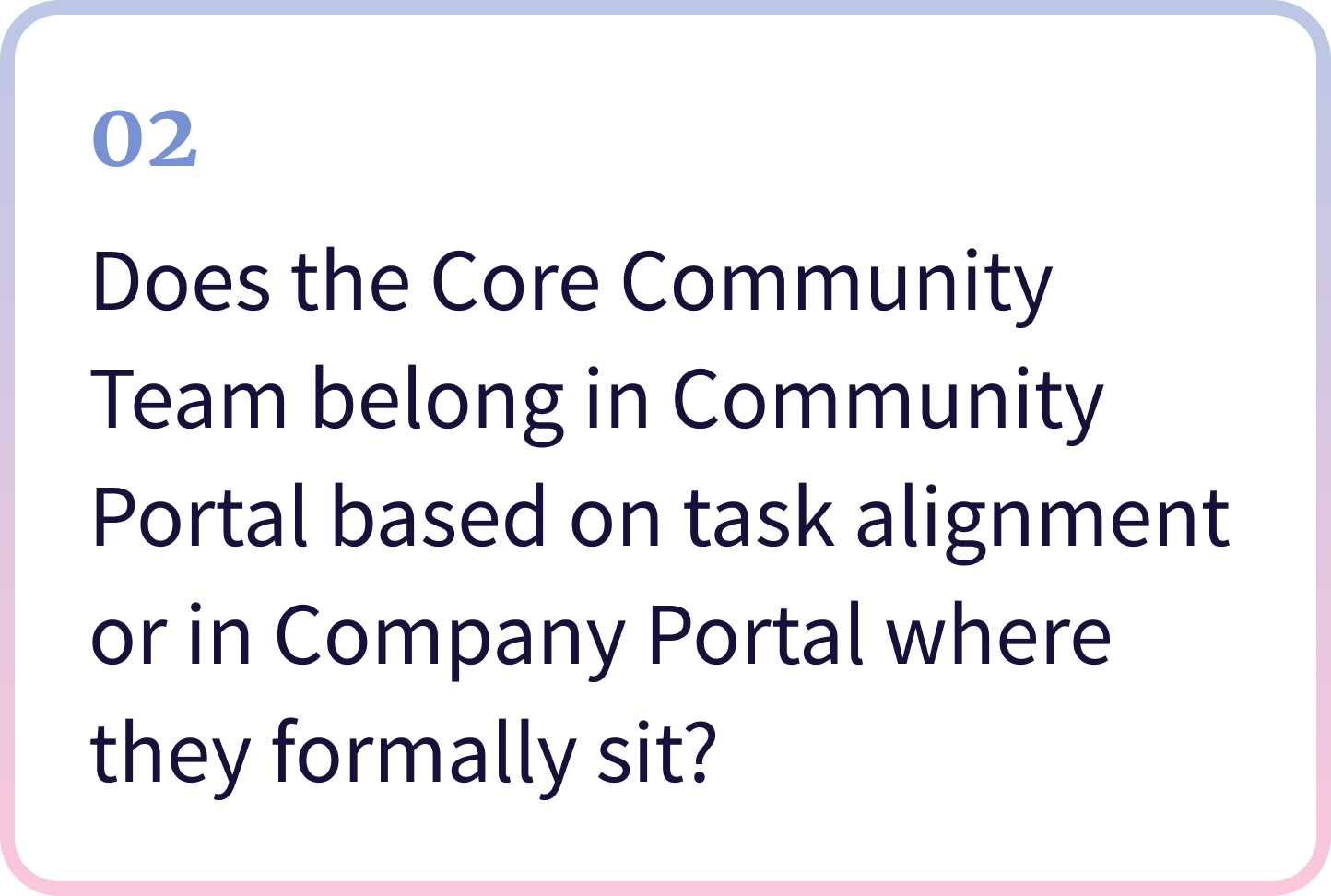
Where does the Team managing Abulé’s core community belong?
What must ship first to unblock launch?
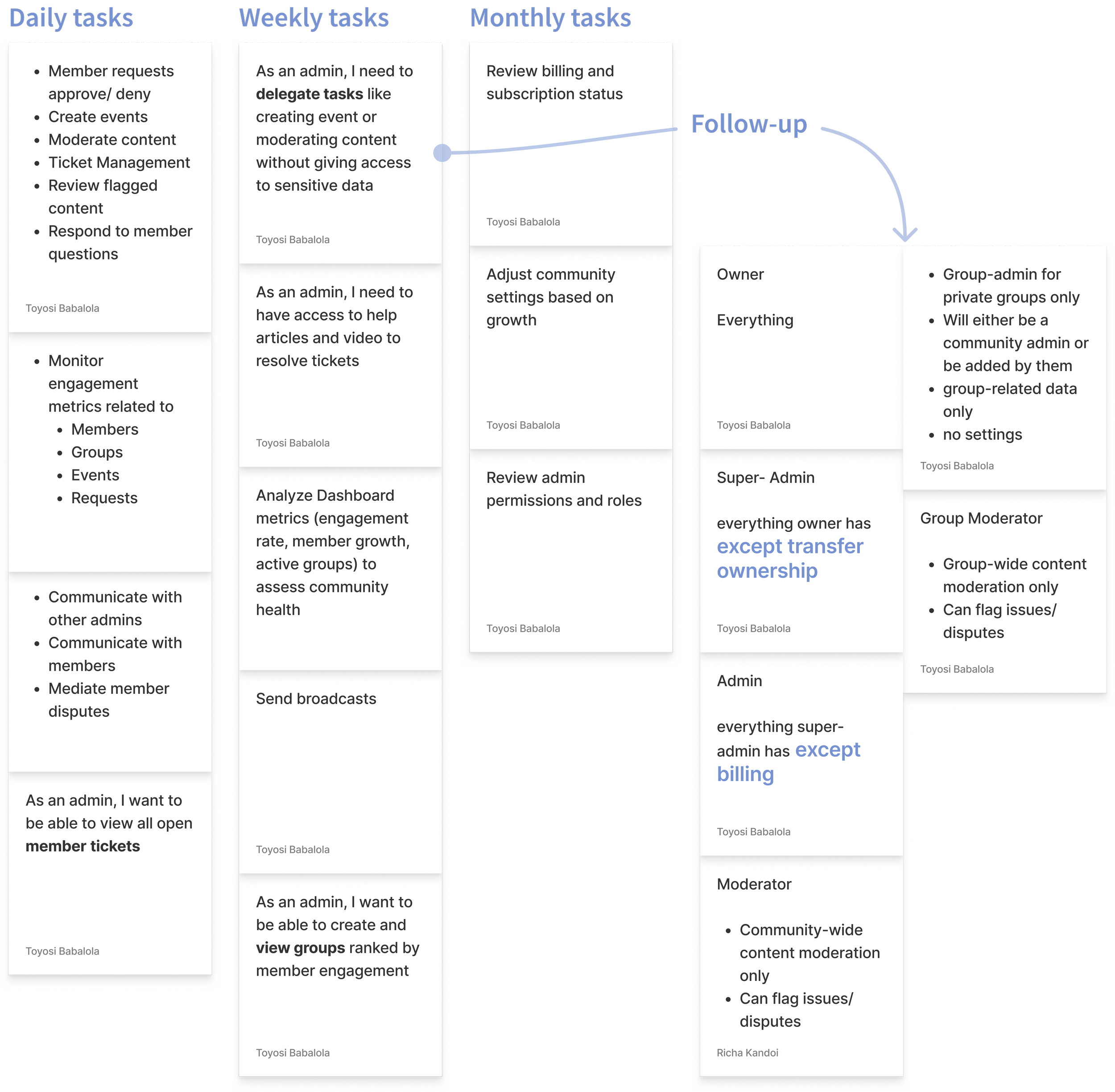
The PRD made one thing clear- we needed two admin environments:
1. Community Portal for → Web-app members who manage their communities
2. Company Portal for → Abulé’s internal operations teams (leadership, sales, product, support etc.)
RESEARCH
Insights from PRD
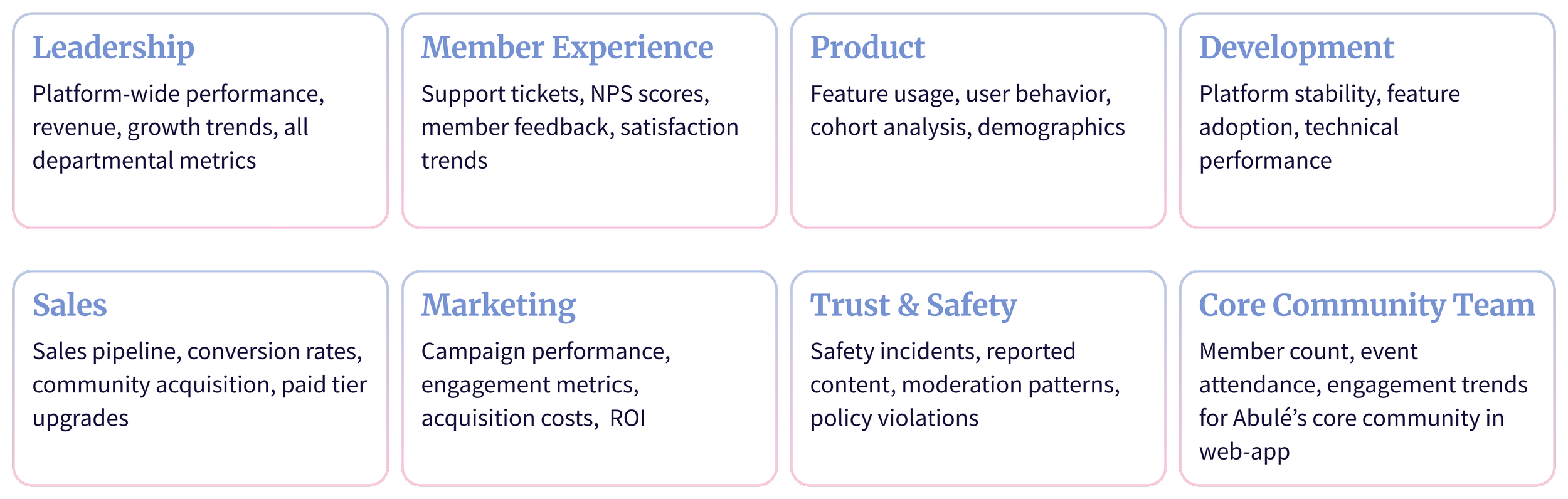
Teams within Abulé’s internal operation
But community admins roles were undefined…
… PRD listed Owner, Super Admin, and Moderators without defining their responsibilities or permissions.
I clarified these needs through sessions with the Founder and a Platform Team member who would run Abulé’s default community.
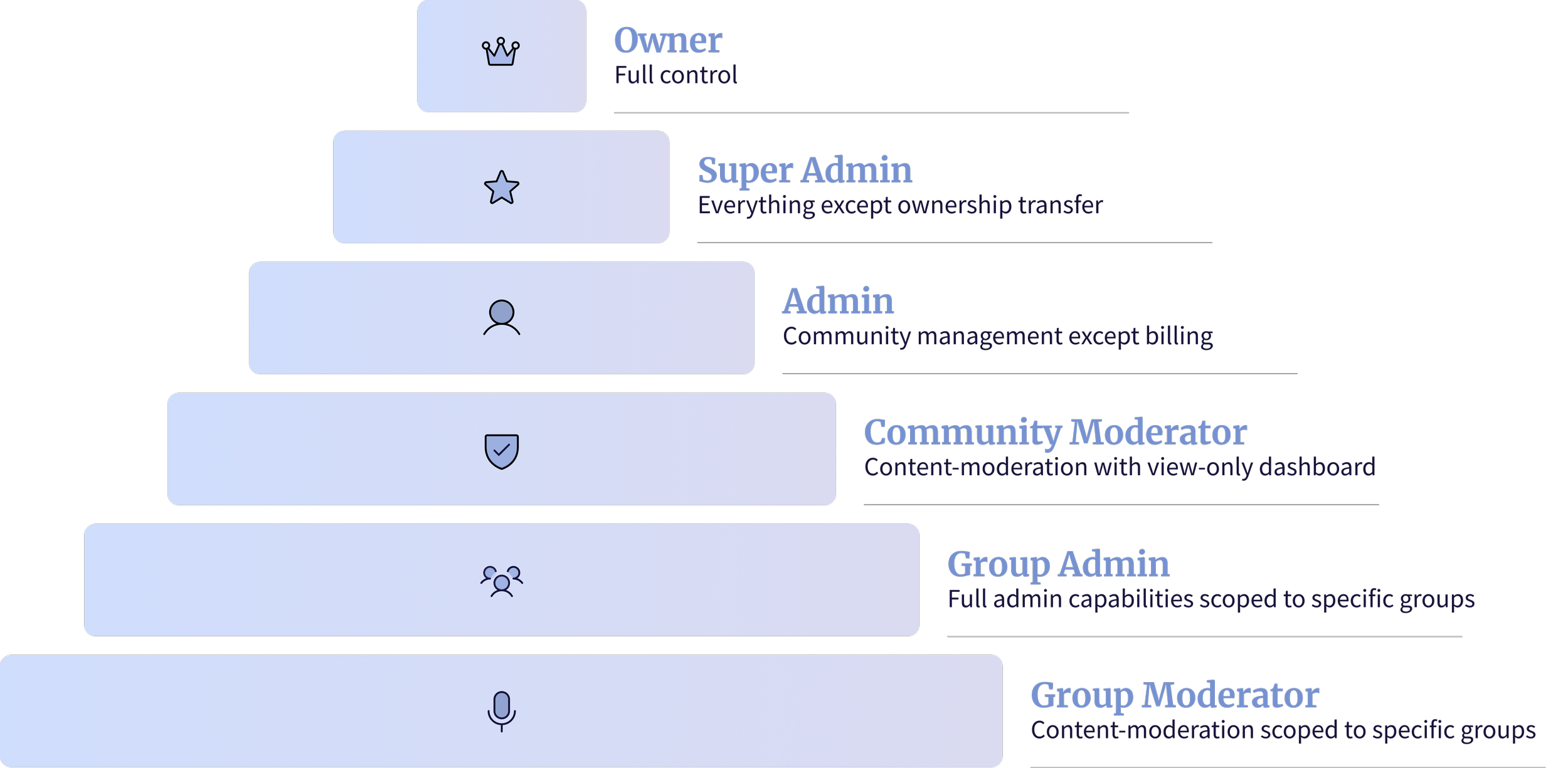
Based on the insights, I worked with the Founder and Engineering to define six hierarchical roles of community admins, with clear permission boundaries and role-based access built into Community Portal.
DEFINE PLATFORM ARCHITECTURE
Clarity in role definition brought forward two critical system questions
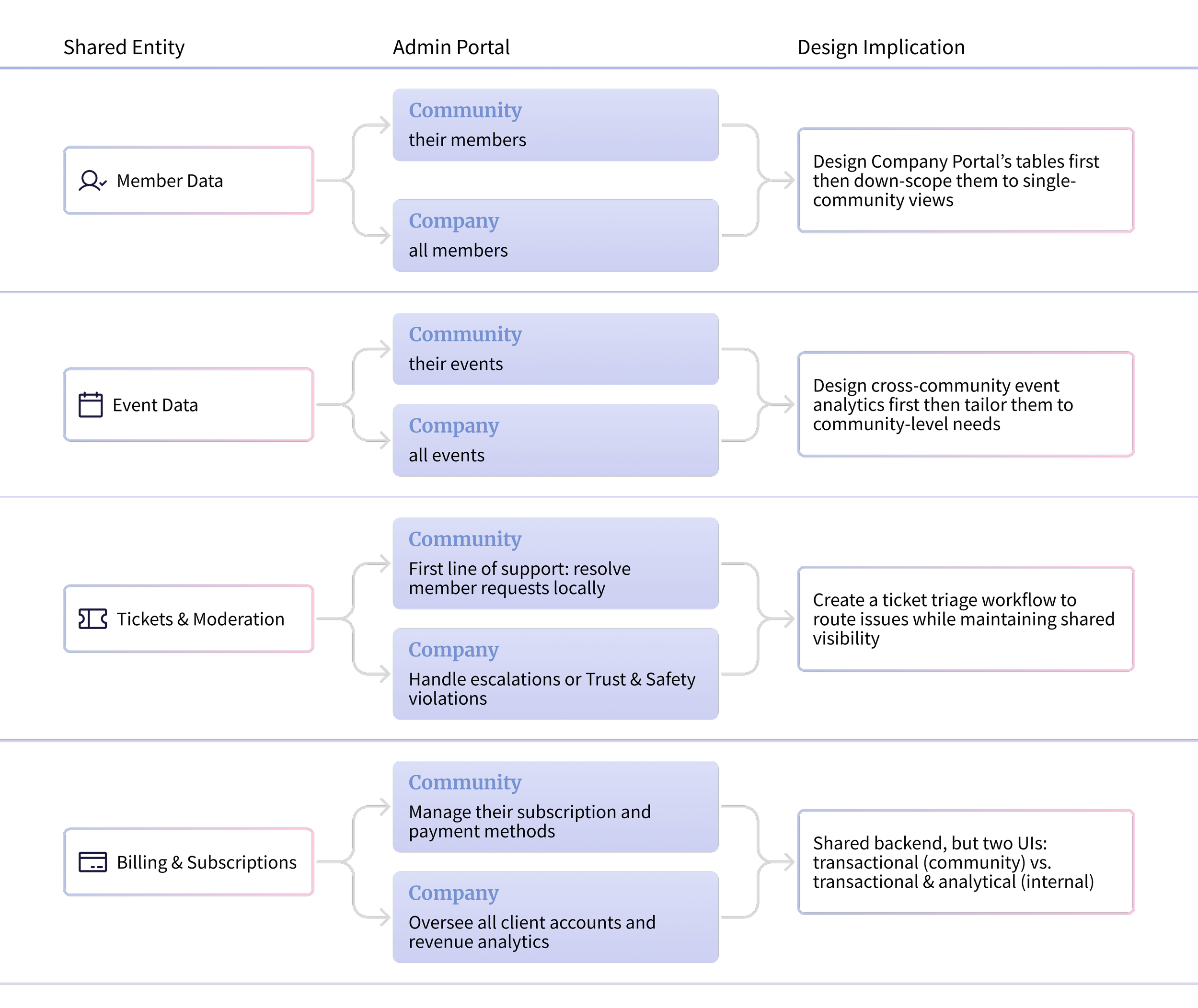
I mapped the intersections to identify shared data and workflows, revealing four areas with different scopes and the backend touch-points engineering needed.
#1 Where do permissions and responsibilities intersect?
For these intersection areas- Members, Events, Tickets, and Billing, we agreed to:
Design Company Portal’s complex tables first, then adapted the same patterns for Community Portal.
Build a shared ticket-triage workflow spanning both portals.
Separate transactional vs. analytical billing UIs with shared backend.
The Founder and Lead Engineer initially leaned toward the Company Portal because the team is technically part of Abulé’s internal operations. But after analyzing their day-to-day tasks, I realized this assumption would create unnecessary complexity.
#2 Where does the core community team fit?
What I found out
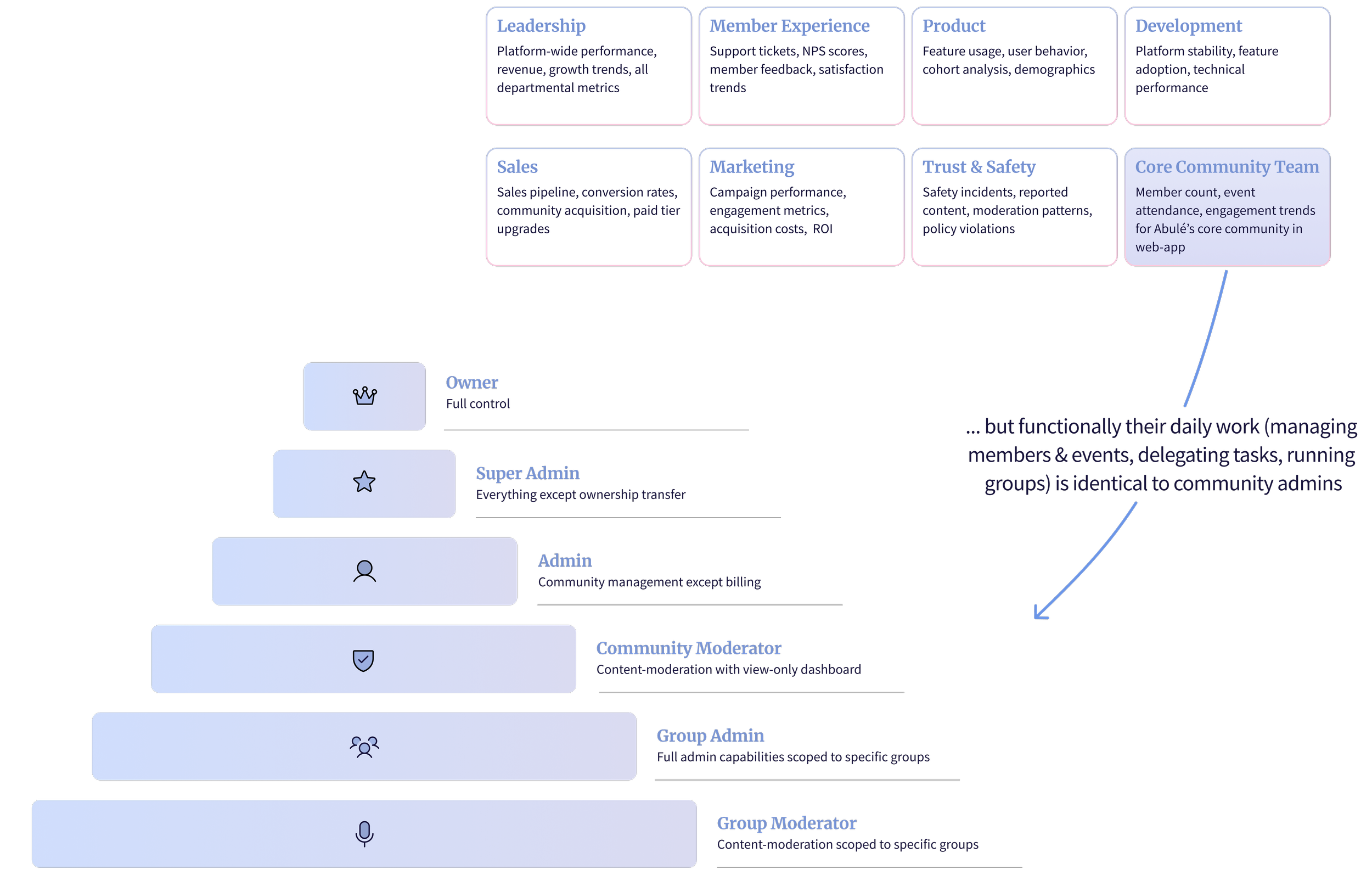
Organizationally they belonged to the company…
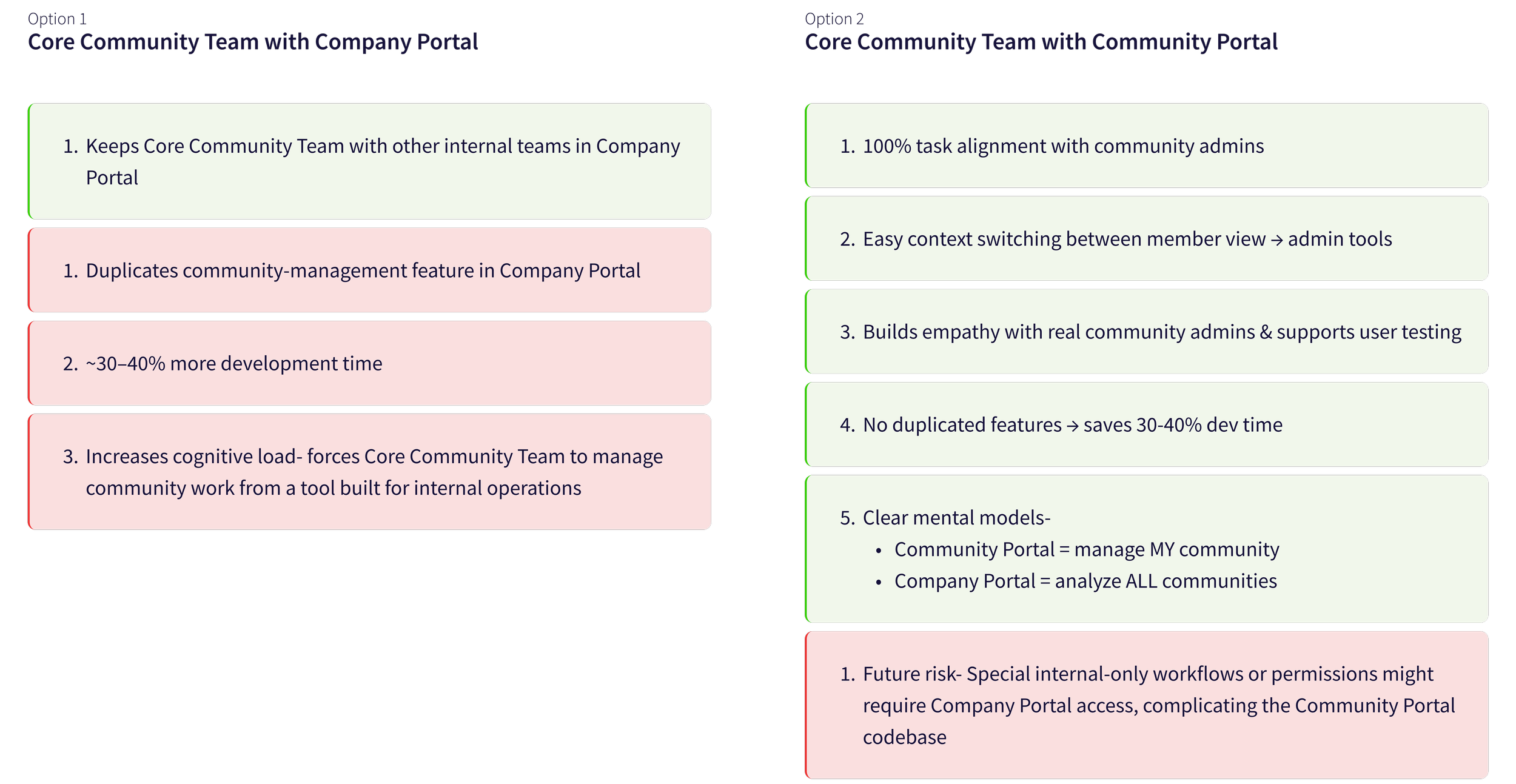
To unblock this decision, I mapped their tasks and weighed pros and cons of two options with the Founder and the Lead Engineer:
Option 2 was saving us ~30-40% dev time, it was huge!
The Decision
The Core Community Team uses the Community Admin Portal.
I addressed engineering’s concern about internal-only workflows complicating the Community Portal.
I discussed with the Lead Engineer what these special edge cases might be and realized that any sensitive or employee-specific tasks (e.g., escalations, financial workflows) would continue to live exclusively in the Company Portal.
This allowed the Core Community Team to manage Abulé’s community without complicating the external-facing codebase.
IT WAS GETTING REAL
Prioritizing community portal’s IA
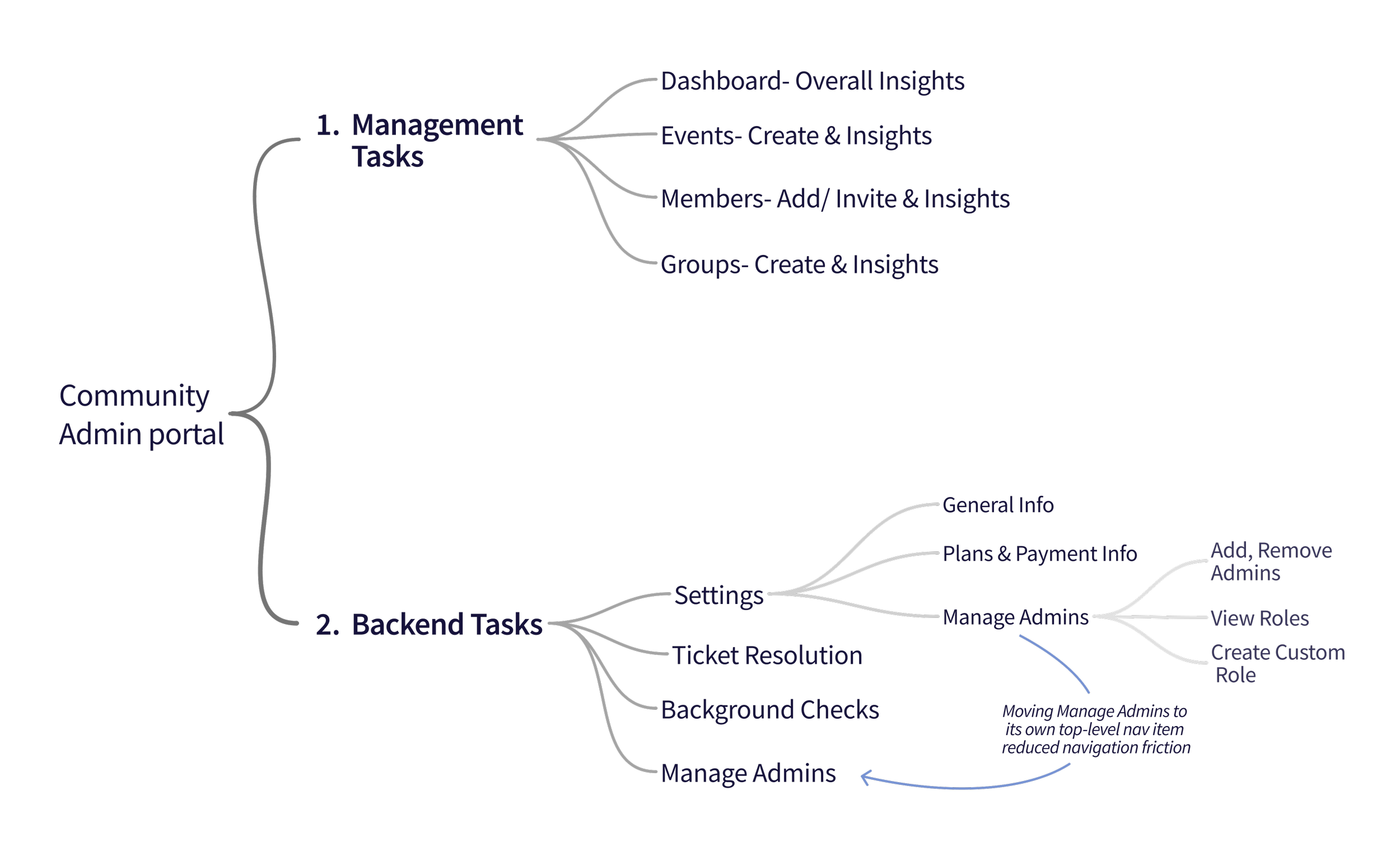
With the Core Community Team now using Community Portal, the priority was to define its IA first. Why? Because communities couldn’t launch without, billing setup, admin delegation, and basic configuration.
Early research showed that admins spent most of their time on strategic community management with task delegation and settings accessed occasionally. This led me to define two primary areas in the IA- management tasks and backend tasks.
I validated this IA direction with the Founder, then gathered specific content requirements
… around what metrics belong in the dashboard, what member details admins need, what event data supports their decisions. These requirements helped me structure the Community Portal into 10 primary sections.
Core management tasks are organized under Dashboard, Members, Groups, Events, etc. while backend tasks sit under Workspace.
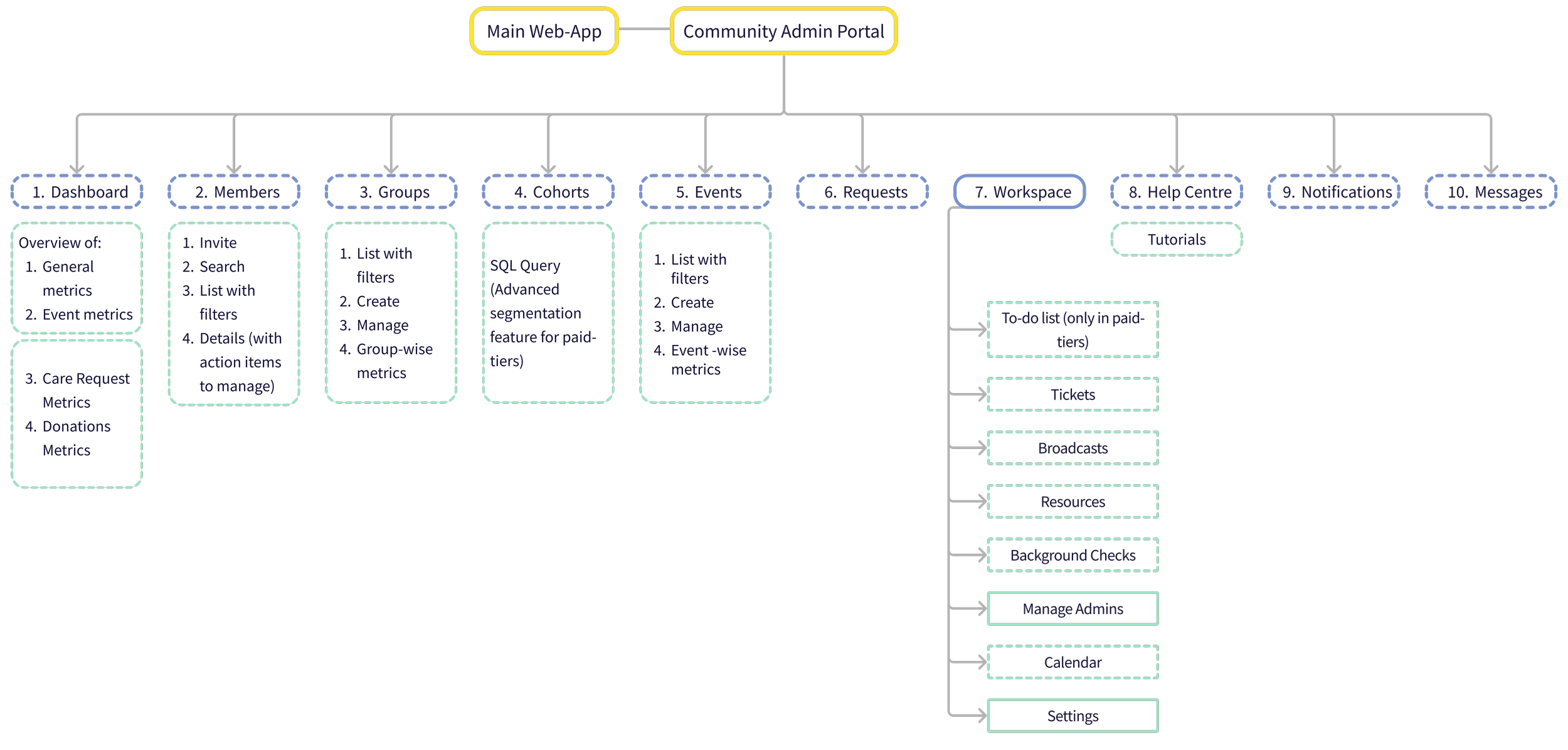
Manage Admins and Settings (solid outline) were Phase-1 priorities. All dashed items were next-launch features, planned but deferred for MVP.
HOW DO WE BUILD THIS FAST?
To ensure the UI could support the defined IA, I adapted the existing design system. This reduced design & engineering lift while giving admins a familiar interaction model. What I did:
Reused and adapted the core layout, left nav, top bar, and workspace, for admin workflows
Used the same tab-header pattern from web-app for sub-sections to keep interactions consistent
Unified top bar across products with a shared switcher (hamburger menu) while keeping messages and notifications context-specific
1. extend web-app’s existing design system
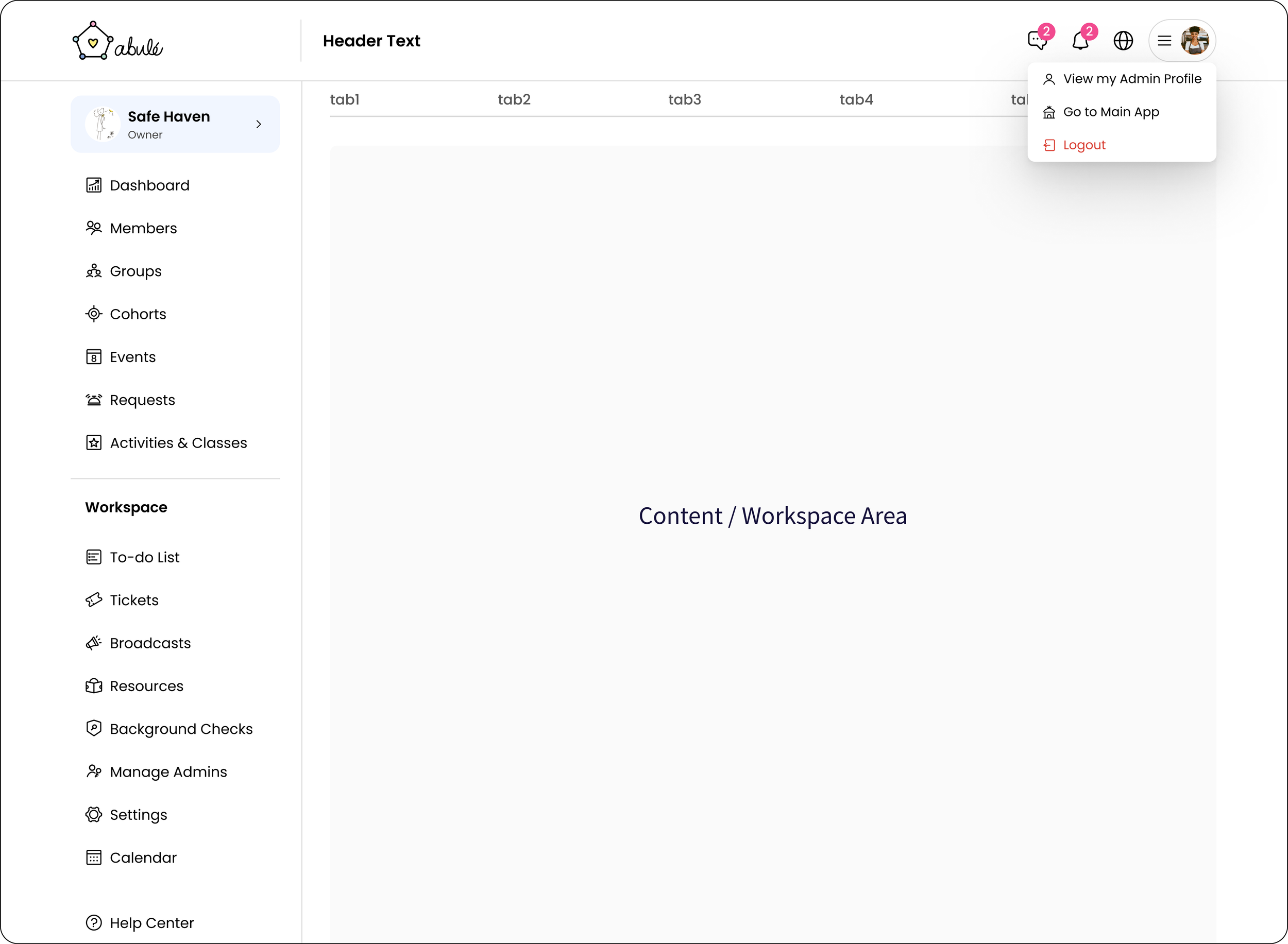
Using existing components and navigation patterns not only sped-up development, it ensured a seamless experience for members switching from web-app to admin portal
2. Align the IA with Role-based access
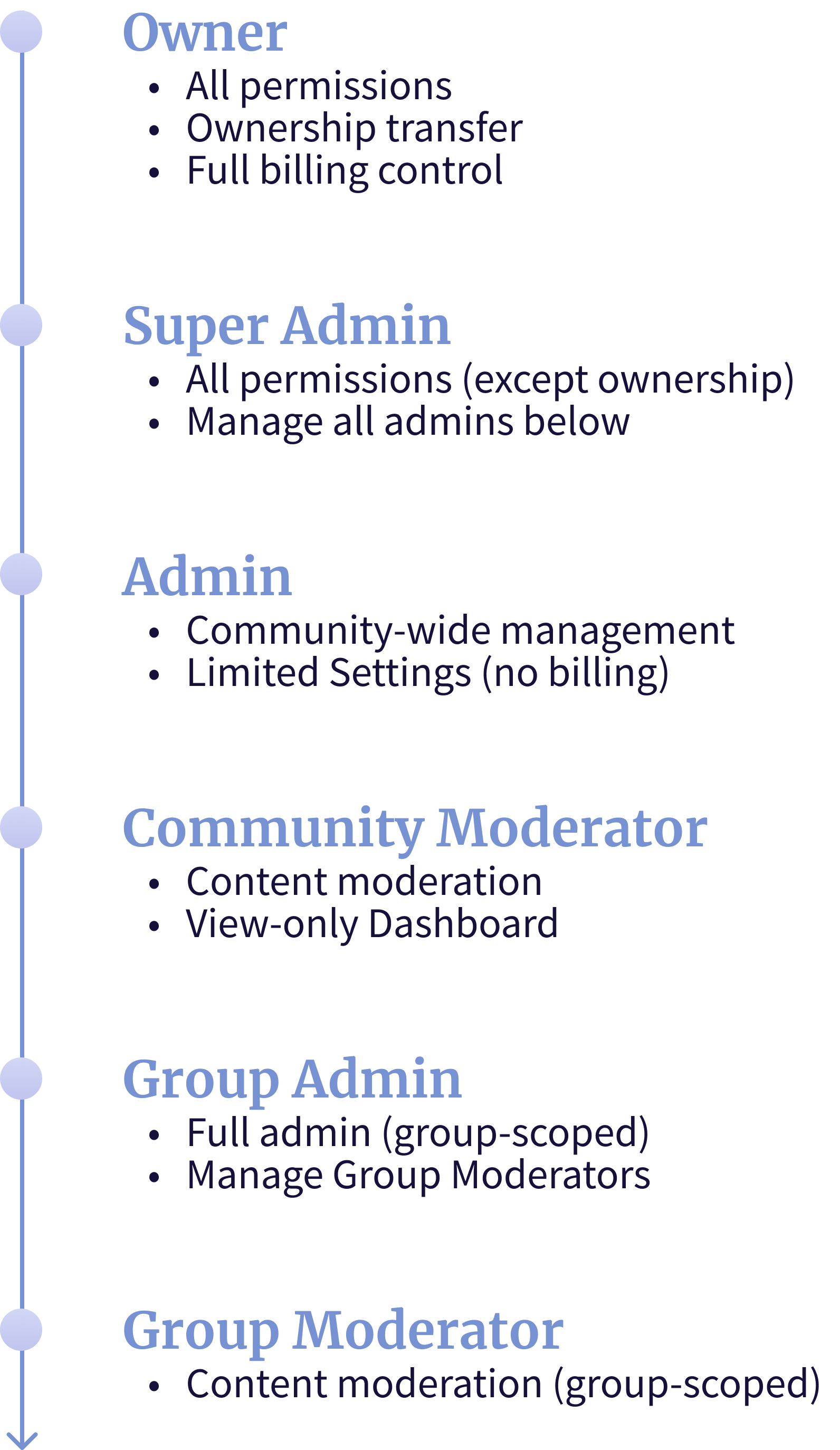
I tested the IA against all six community-admin roles to ensure it scaled properly- each role should only see what they have permission for.
We came up with key design principles to follow:
Inheritance: Higher roles automatically get lower role permissions
Scope-based: Community-wide vs. group-specific access
At or below level: Admins manage only roles beneath them
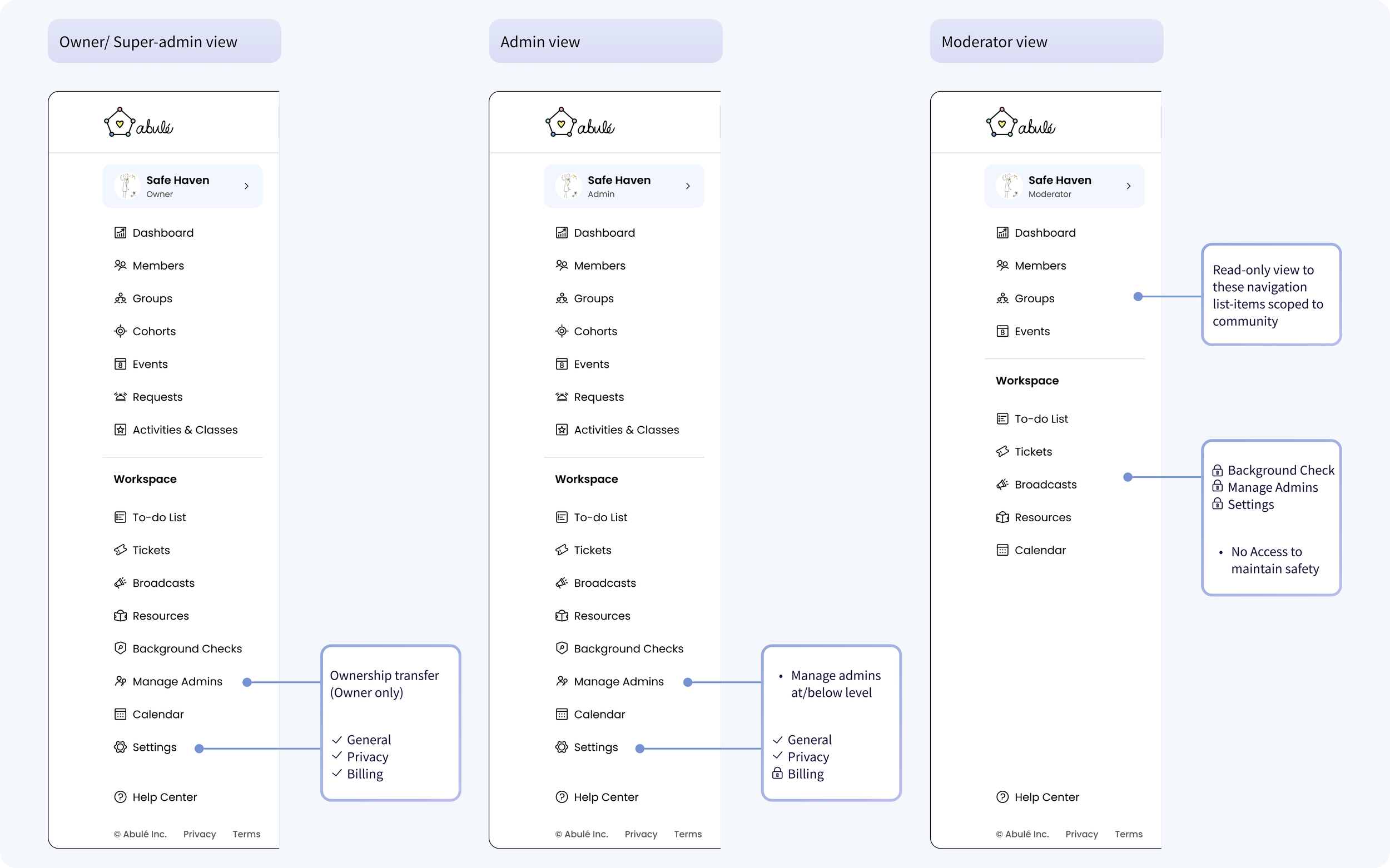
Navigation tailored to community-wide roles: Owner, Super Admin, Admin, and Moderator
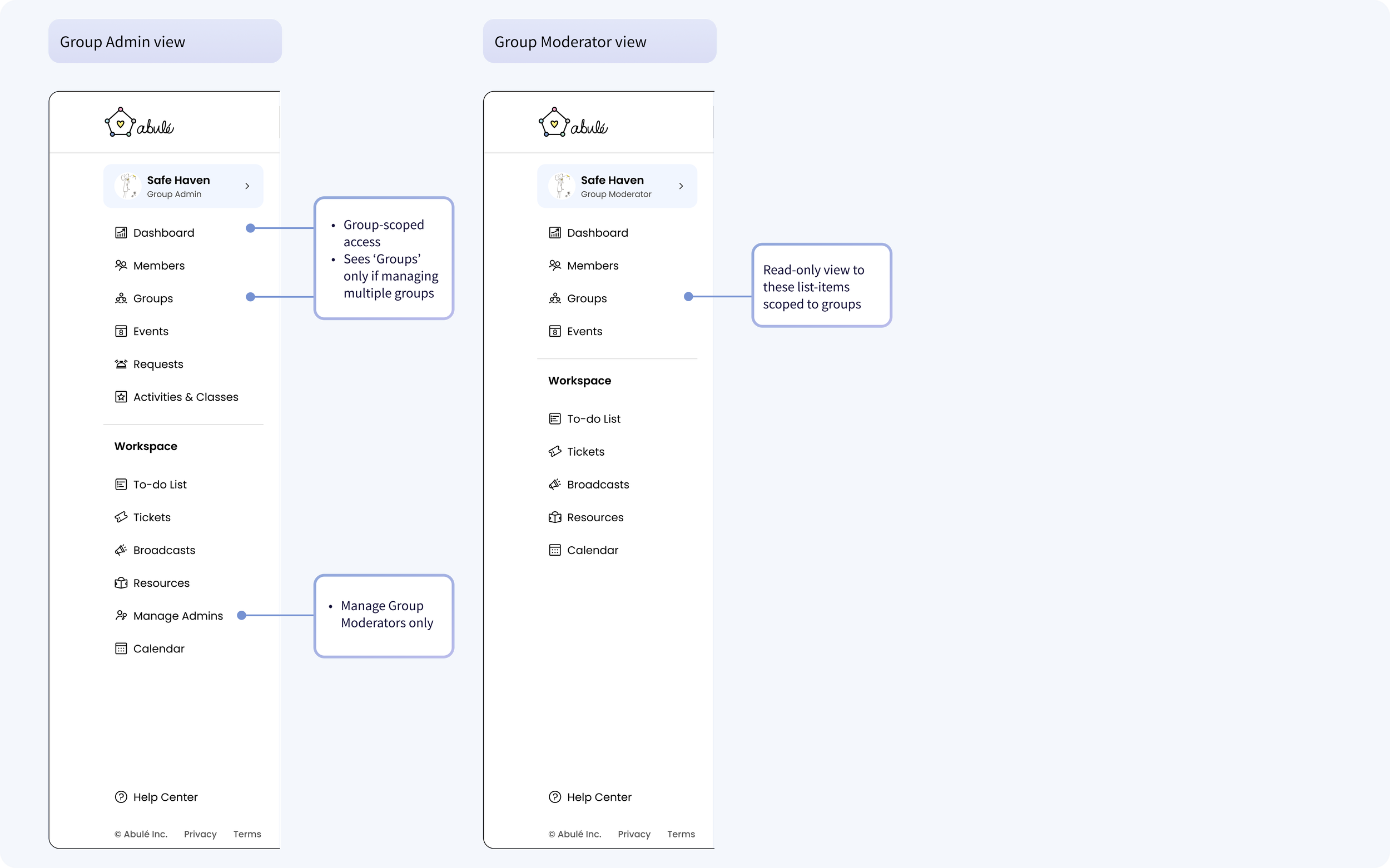
Navigation tailored to group-wide roles: Group Admin, Group Moderator
3. Phased rollout strategy
Designing all 10 sections with 6 role levels was the ideal solution but building it end-to-end would have taken far longer than our timeline allowed. I prioritized based on launch dependencies and the intersection strategy.
Because moderation, requests, and events were already available in the web-app, we didn’t have to include them in first Admin Portal release. That saved engineering time. Phase 1 only served roles who needed Settings and Admin Management.
Community Portal:
Admin Management
Settings (General and Billing) - While billing data was an intersection area, billing management UI was unique to Community Portal's Settings.
Phase 1: High priority modules
Company Portal Intersection Areas:
Members section - aggregated, cross-community data
Events section - I established UI patterns for Events section that would be adapted for Community Portal in Phase 2.
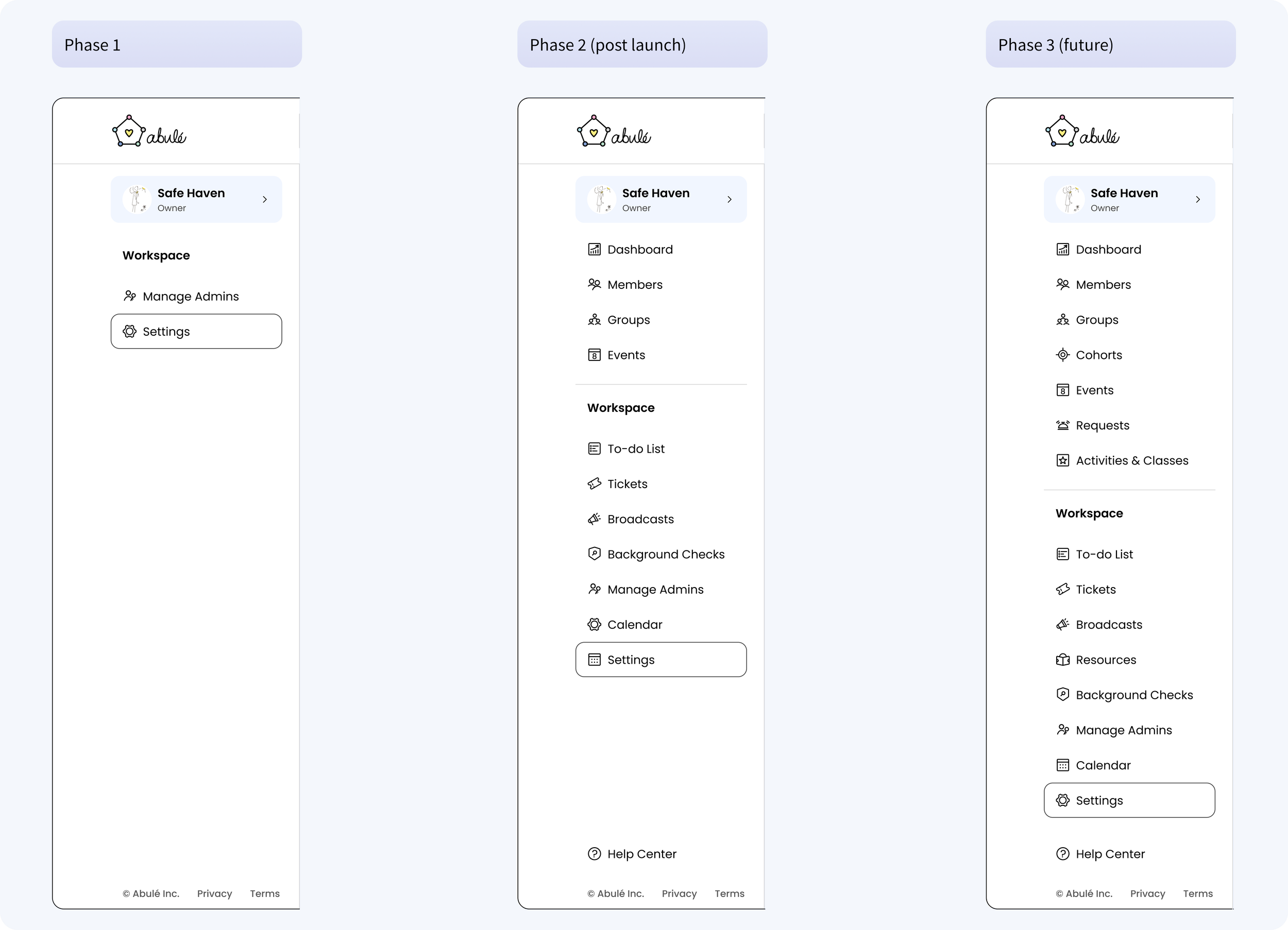
Navigation per launch phases
Phase 2: Post launch
Adapt Company Portal patterns to Community Portal Members and Events
Dashboard, Groups, and Workspace features
Phase 3: future (web-app dependent)
Care Request and Donations metrics in Dashboard, Cohorts, Requests, Activities & Classes, Resources
Settings
Different admins needed different levels of control in Settings; Owners needed full access, while admins should not see or touch billing or sensitive setup. To support scalability and role-based access from day one, I structured Settings into three tabs:
General: enter and update general info
Plans & Billing: manage plans, payments and upgrades
Privacy & Security: edit community visibility and membership approval
DESIGNING LAUNCH BLOCKERS
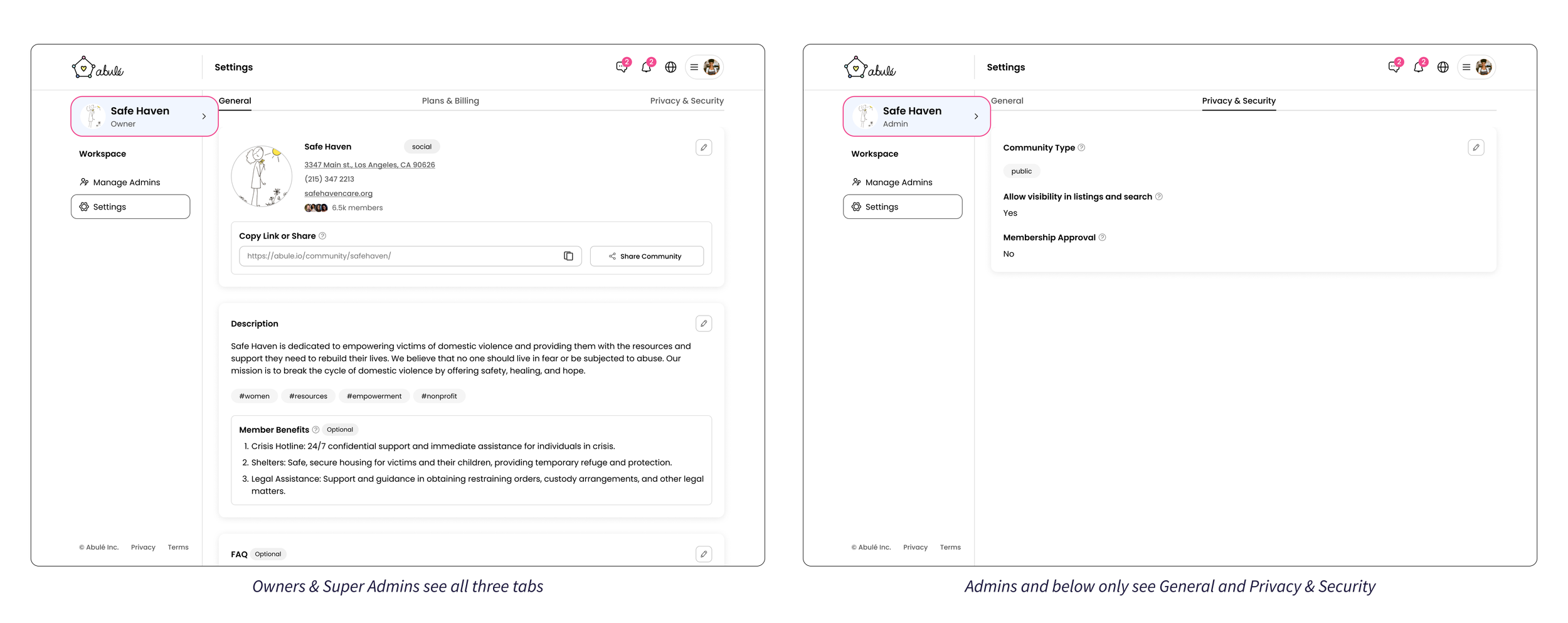
Non-accessible tabs are hidden entirely
Prototype shows how an Owner would use the Phase-1 admin portal. I reused the same drawer pattern from the web-app, so the experience felt familiar and was quicker for engineering to build.
Navigation with just Manage Admins and Settings
Settings → General: update community info using drawers
Settings → Plans & Billing: edit payment methods and upgrade plans, also through drawers
Managing admin roles was a high-risk area so clarity mattered. Admins needed to understand roles without accidentally changing permissions while learning. To reduce mental load and prevent mistakes, I split Manage Admins into two tabs:
Admins: view all admins in the community, their roles and activity, take quick or bulk actions and add new admins.
Roles & Access: understand what each role can do and create custom roles (in paid tiers)
Admin Management
In real communities, one person often works at different levels. To support this we allowed admins to have multiple roles so the same person can manage the community broadly while also owning specific groups, without duplicating accounts or roles.
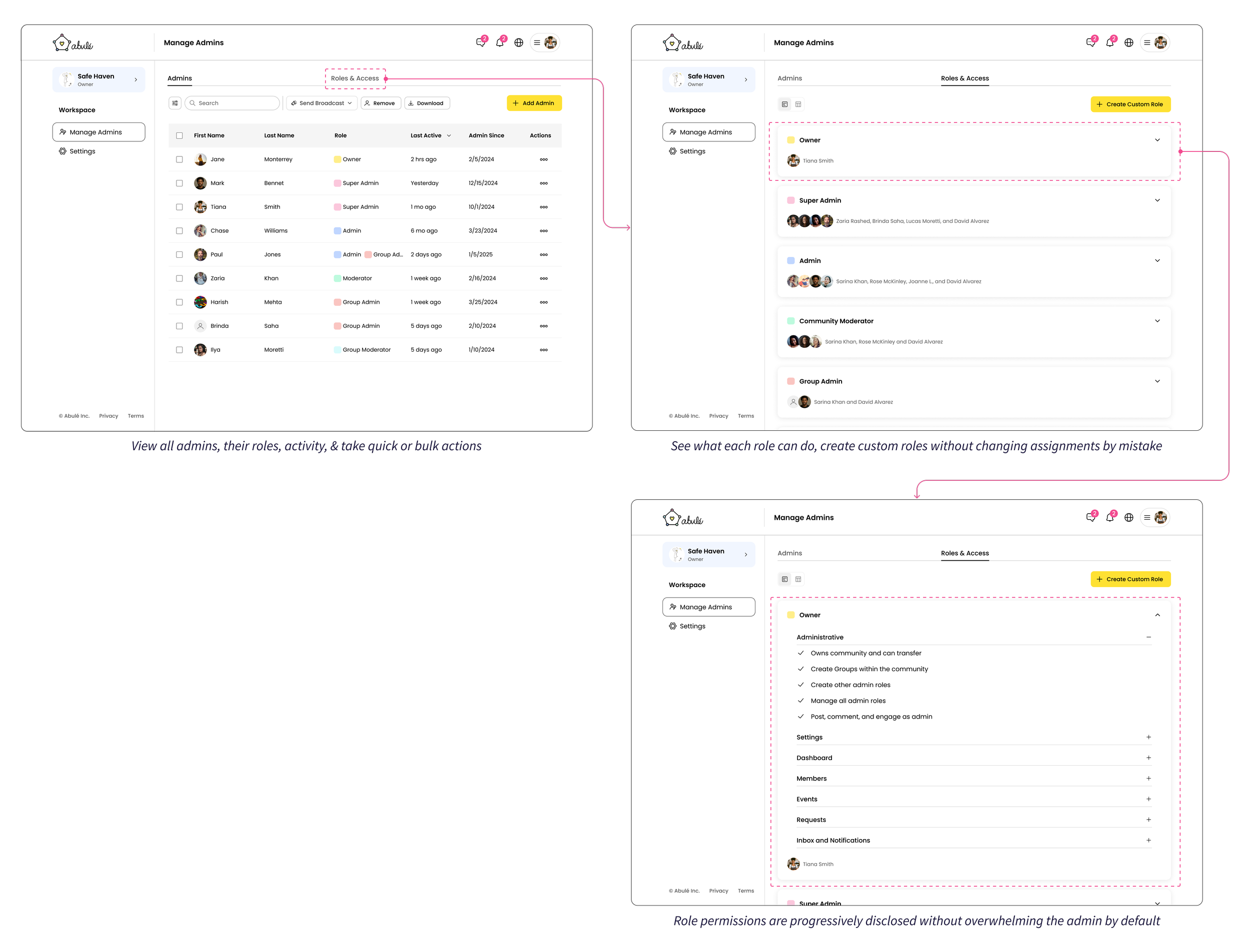
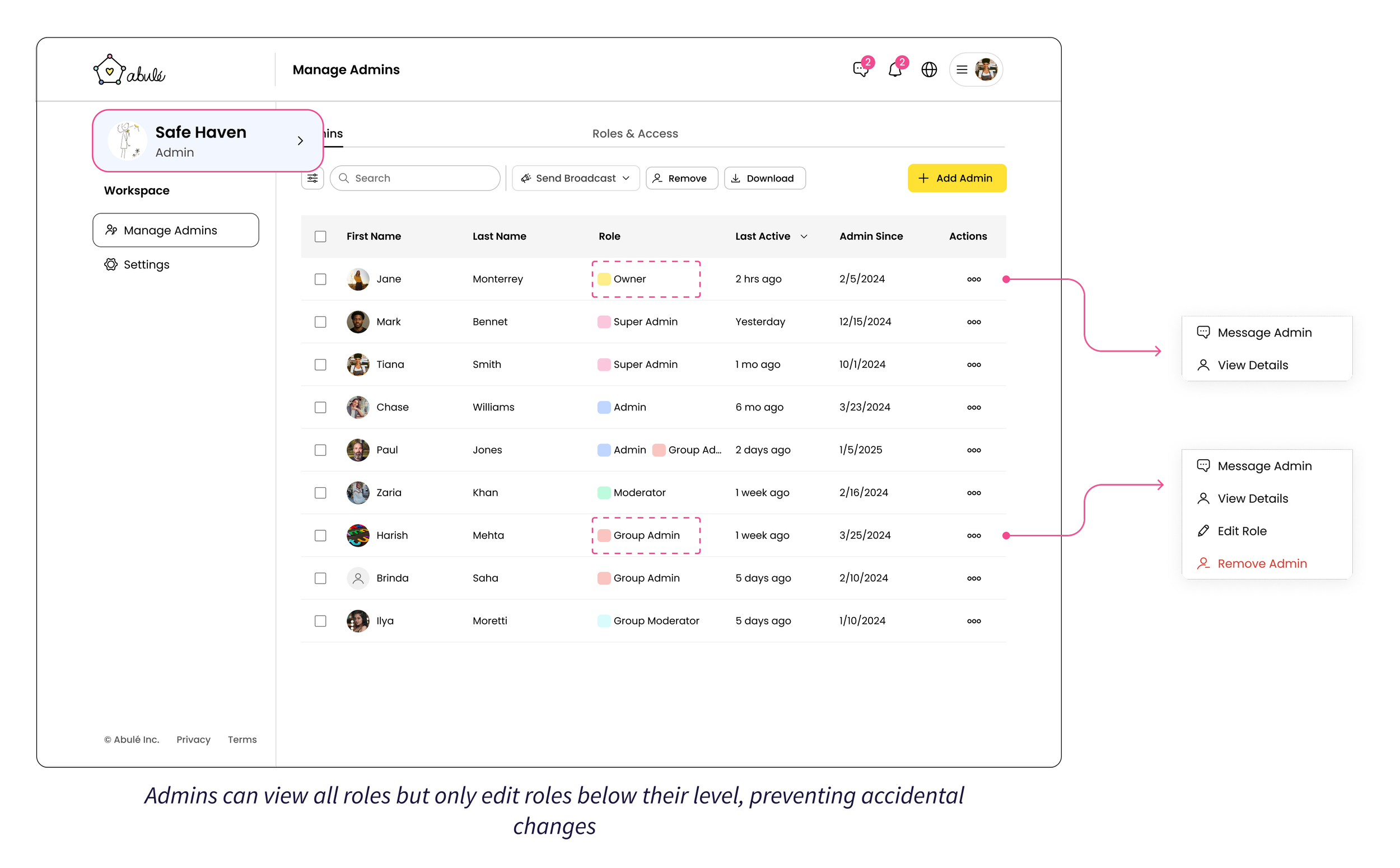
Admin role management with built-in guardrails:
Roles are color-coded for quick recognition
Action menus adapt by hierarchy. Admins can only edit or remove roles below their level.
In this flow, an admin promotes a group moderator to admin, reviews the added permissions step-by-step, then
Adds a new admin through a guided drawer that only shows eligible roles and members
OUTCOMES
I delivered the Community Admin Portal design within the 2-month timeline, along with strategic architecture that shaped the broader platform: